Introduction
Solar energy plays a crucial role in meeting energy requirements in a sustainable manner. Though solar energy is abundant, finding suitable sites where it can be economically and efficiently harnessed is a major challenge. These challenges arise from geographical settings, solar resource availability, and the infrastructure needed to build, utilize, and efficiently harvest solar energy
For planning suitable sites, users can apply multi‑criteria approaches to identify optimal locations. Methods involving Multi-Criteria Decision Analysis (MCDA) are commonly used. These are empirical algorithms, but with the advent of machine learning, MCDA‑type (binary) problems can also be solved using forest‑based classification algorithms.
Forest Based Classification
A random forest is a meta‑estimator that generates a best‑fit model by training a large number of decision tree classifiers on different sub‑samples of the dataset. It uses averaging and voting mechanisms to improve generalization and prediction accuracy. Every tree produces its own prediction, and these predictions are then aggregated to arrive at the final output. Thus, the final prediction is not determined by any single tree but by the combined knowledge of the entire forest.
Forest Based Classification Workflow in ArcGIS Pro
Forest Based Classification in ArcGIS Pro requires three major components:
1. Predictor Variables (Raster features used by the ML model)
2. Label Data (Positive & negative training samples i.e. combination of existing location where solar farms currently exist and where they do not)
3. Mask Raster (Optional: areas to exclude)
Inputs to Forest Based Classification
Predictor Variables
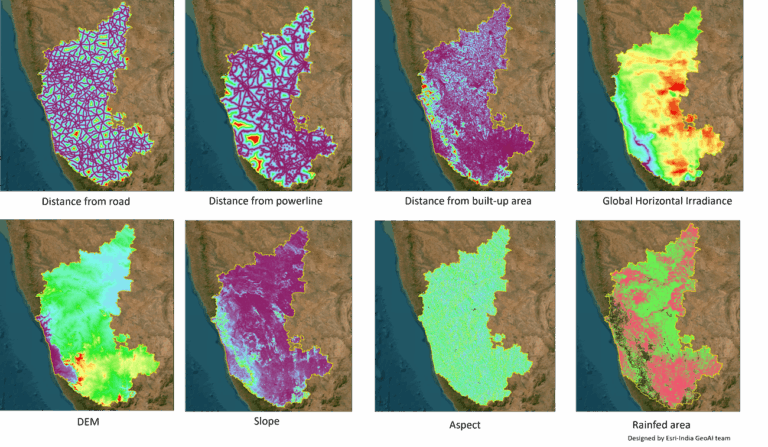
These rasters represent environmental, infrastructural, and topographical variables that influence solar site selection. The Forest-based Classification model uses these layers as independent variables. The criteria include distance from roads, distance from power lines, distance from settlements, Digital Elevation Model (DEM), aspect, slope, Global Horizontal Irradiation (GHI), and triple‑crop areas. Exclusion areas such as water bodies, wetlands, and forests are treated as binary no‑go zones coded as 0 or 1. Details of the criteria and their descriptions are provided in Table 1.
| Criteria | Input Type | Description |
| Distance from major roads (state, district, national) | Distance Raster | Indicates accessibility & transport feasibility |
| Distance from powerlines | Distance Raster | Proximity to grid reduces interconnection cost |
| Distance from settlements | Distance Raster | Avoids conflicts with residential areas |
| DEM | Raster | Base elevation used for site engineering |
| Slope | Raster | Critical for panel installation and drainage |
| Aspect | Derived rasters: Northness (cos) and Eastness (sin) | Directional influence on solar irradiance |
| Global Horizontal Irradiation (GHI) | Continuous Raster | Key predictor of solar potential |
| Land Use / Triple Crop Area | Binary Raster (0/1) | Avoidance of high-value agricultural land |
| Water bodies, wetlands, forests | Binary Raster | Used in creating negative samples & masks |
Table 1: Criteria and description
Figure 1 shows the raster inputs used as criteria for the model. It should be noted that for better results, all predictors must share the same projection, cell size, and alignment.
Label Data (Target Variable)
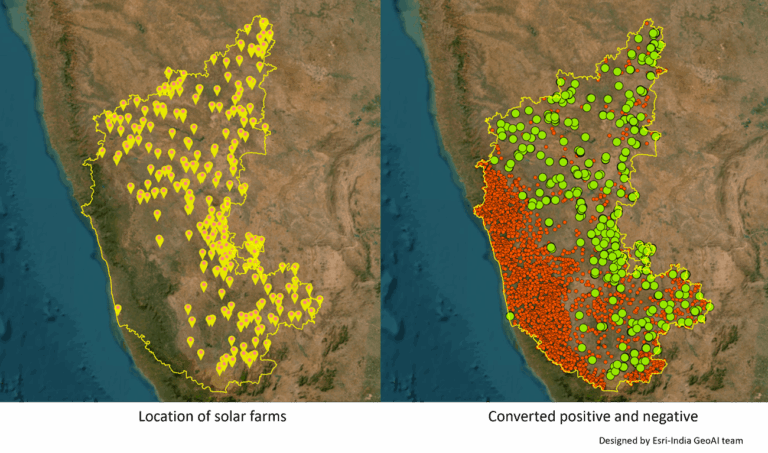
Forest-based Classification requires a classification label. Positive samples are point features derived from existing solar farm polygons or their centroids. Negative samples are generated from settlements, forest areas, water bodies, wetlands, triple‑crop agricultural land, a 500‑meter coastline buffer, and other non‑permissible (no‑go) zones. Table 2 shows the label data, meaning and related description. Image A shows the locations of the solar farms, and Image B shows the corresponding positive and negative samples. These positive and negative samples are then used as training data for the model to learn.
| Label | Meaning | Description |
| 1 | Suitable | Existing solar farms (positive samples) |
| 0 | Unsuitable | Random points generated from No-Go zones |
Table 2: Label Data
Forest Based Classification in ArcGIS Pro
ArcGIS Pro provides easy to use tools to work with Forest Based Classification. These are part of both Spatial Statistics Toolbox and GeoAI Toolbox. In the current blog Spatial Statistics Toolbox has been used.
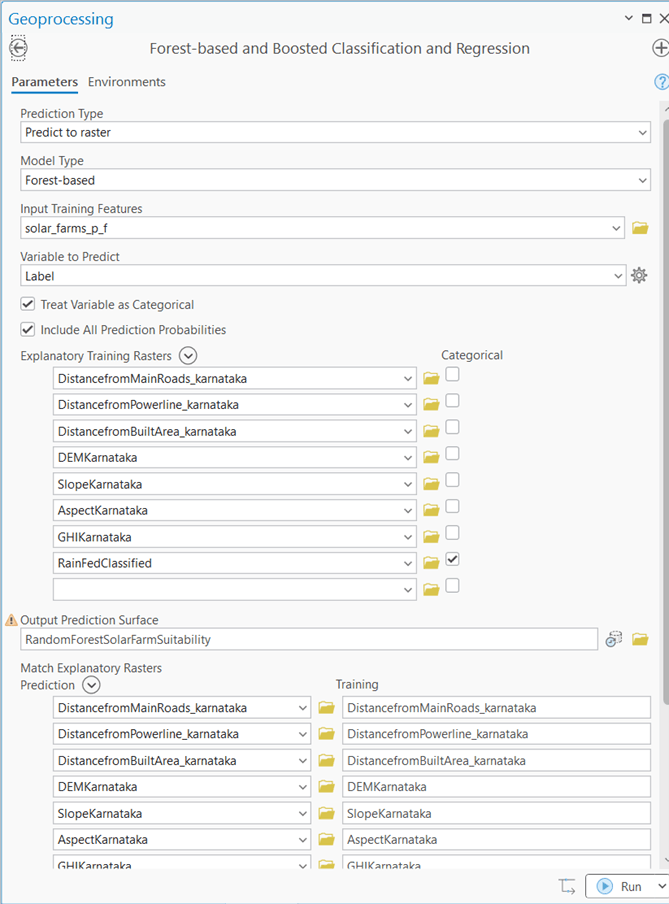
Run the tool “Forest-based and Boosted Classification and Regression” tool by selecting model type as Forest-based and selecting required predictor variables. Figure 3 shows tools with parameter including training samples, predictor variables and other necessary inputs to run the tool.
The tool generates a set of outputs that can be further utilized for analysis. These include a trained Esri model file (.eml), which stores the final classifier so it can be applied to new areas or updated datasets without retraining.
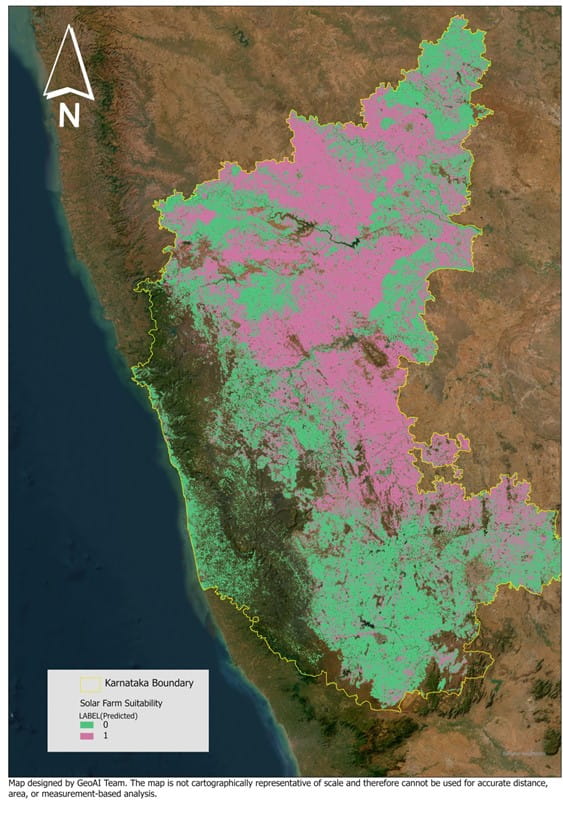
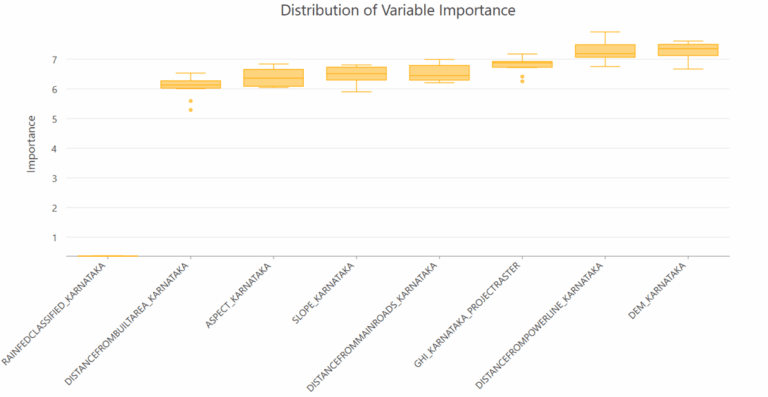
The Solar Suitability Raster (Figure 5) provides a binary surface with 0 (unsuitable) and 1 (highly suitable), helping users visualize where conditions are most favorable. To explain the factors driving the predictions, the Feature Importance Report (Figure 6) ranks the variables that contribute most to the model, enabling transparent communication of assumptions and supporting regulatory reviews.
To validate model performance, the Accuracy Metrics include a confusion matrix, precision–recall values, and cross‑validation results. This provides a clear understanding of the model and its overall accuracy.
We can use the raster output and apply policy‑based filters to identify contiguous areas-typically 50 hectares or more- that meet the minimum size requirement for solar farm development. These suitable zones can then be overlaid with land ownership and relevant land‑use layers to assess ground feasibility. The resulting shortlisted sites can subsequently be validated by field teams using standard field verification techniques.

Shivaprakash, manager on the Presales team, designs India-specific GIS solutions for Esri India customers.