A basemap is the view only foundational layer and data that gives a map or scene its visual and geographic context. It is what lets you see, at a glance, where things are and how they relate to each other. It typically includes features and labels for land, water, roads, buildings, cities, places, and administrative boundaries, and it can include satellite and aerial imagery as well. Whether you are looking at a city block or an entire country, the basemap is what grounds the view.
So, what is a vector basemap?
A vector basemap is a foundational geospatial data layer represented in vector format and designed to provide contextual geographic information (such as roads, boundaries, land use, water bodies, and points of interest) for overlaying additional thematic or analytical map layers.
Vector basemaps are dynamic. They are scalable. They are customizable. And they are noticeably more flexible than traditional raster basemaps, because the styling lives separately from the data.
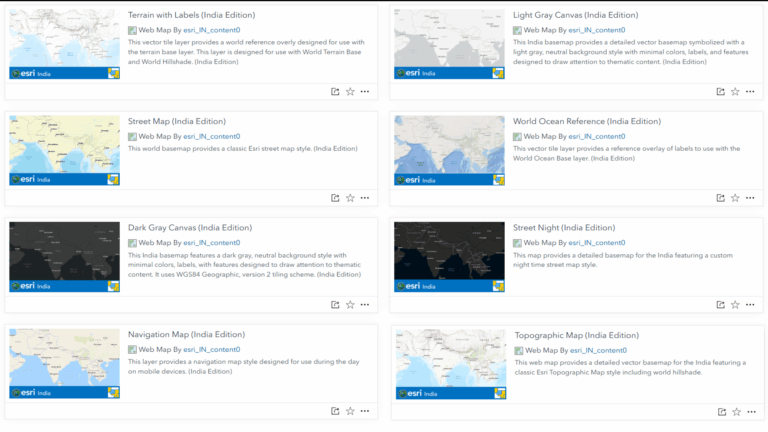
The vector basemaps have become a quiet workhorse of modern GIS, used in dashboards, field apps, story maps, and analytical workflows across industries. They are now available for organisations that build their geospatial environments on ArcGIS Enterprise. Through the Esri Vector Basemaps, you get vector basemaps in various styles.
Where vector basemaps actually get used?
Vector basemaps show up across day-to-day GIS work:
- Operational dashboards that monitor fleets, assets, incidents, or field crews, where a clean, branded basemap keeps the focus on the data on top.
- Field apps on mobile devices, where compact tiles and crisp rendering matter on patchy networks and varied screen sizes.
- Defence and public safety maps, where official administrative extents and controlled detail are not optional.
- Story maps and public-facing portals, where consistent cartography reinforces the message.
- Analytical workflows in ArcGIS Pro, where the basemap is a reference frame for everything from suitability analysis to network design.
- Custom-styled organisational basemaps that align with brand guidelines or operational standards.
If your work involves a map at all, there is a good chance a vector basemap is the right surface to put it on.
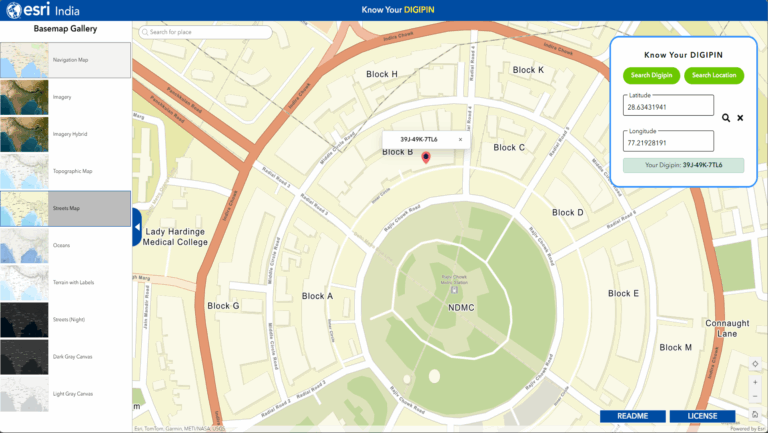
What vector tiles bring to your maps?
Vector tiles are a flexible delivery format that has become a foundation of modern cartographic workflows. A vector tile holds the underlying geometry and attribution, and the client renders it on the fly using a style specification. That architecture opens several capabilities:
- Dynamic cartography. A single set of tiles can power multiple visual themes, such as a dark gray canvas theme, a light gray reference theme, or a custom organisational basemap, all driven by different style files.
- Crisp rendering across devices. Because rendering happens on the client, labels and lines stay sharp on high-DPI displays at every zoom level.
- Efficient. Vector tiles are typically compact, which is helpful on constrained networks and field connections.
- Stylable to your standards. Organisations that need to meet specific cartographic standards can build their own styles on top of the same tiles using ArcGIS Vector Tile Style Editor app.
These strengths make vector basemaps a strong fit for many enterprise applications. They sit alongside raster basemaps, and the two formats work together in everyday use. Imagery hybrid, for example, depend on imagery beneath a hybrid reference layer, and a well-equipped ArcGIS environment usually draws on both.
Why Esri Vector Basemaps?
Open source and globally aggregated vector basemaps are widely available, and they serve many general-purpose mapping needs well. However, when these basemaps are evaluated for use within Indian government, defence, and enterprise workflows, a number of considerations emerge that organisations should weigh carefully. The Esri Vector Basemaps has been developed with the requirements of Indian organisations in mind, with attention to the regulatory, operational, and security expectations that apply to government, defence, and enterprise users.
Depiction of national boundaries. For government, defence, and public-sector applications, the use of authoritative national boundaries is a baseline requirement. Esri India provides geospatial solutions that align with officially recognized boundary definitions.
Compliance with national geospatial policies. India’s geospatial policies and data-sharing regulations establish specific expectations regarding the sourcing, and dissemination of location data, particularly for organisations engaged in critical or classified work. Esri India bridges this gap by offering authoritative data integration capabilities, and deployment models that support compliance with national geospatial guidelines.
Annual data refresh. The Vector Basemaps are refreshed on an annual cycle and kept in sync with the corresponding online basemap content, so that on-premises deployments remain current.
Choice of tiling scheme. The basemaps are provided in both Web Mercator Auxiliary Sphere (WMA) and WGS84/GCS tiling schemes, allowing organisations to select the projection best suited to their applications and analytical workflows, or to deploy both.
Designed for ArcGIS Enterprise deployments. The basemaps can be delivered for use within ArcGIS Enterprise environments, including fully disconnected and air-gapped configurations, so that the basemap content remains entirely within the organisation’s infrastructure.
References:
- ArcGIS Raster and Vector Basemaps Data Pack | Esri India
- Introduction to ArcGIS Data Appliance: Esri Vector Basemaps—ArcGIS Data Appliance Help | Documentation
- Vector Basemaps – Overview
- Working with and Customizing Vector Basemaps: The Basics revisited

As Product Lead, Geetesh focuses on Esri India Data Products, including Indo ArcGIS Living Atlas, Basemaps, and StreetMap Premium.