If you have worked with GIS for some time, this situation may sound familiar.
You open ArcGIS Pro, load a layer, symbolize it beautifully, and perhaps run a few spatial analyses. Then comes the question that changes everything:
“This is great… but what will this look like next year?”
That question changes everything.
Because while GIS is incredibly powerful at showing what exists and what has happened, decision-makers increasingly want to know:
“What’s going to happen?”
This blog walks through a complete, working solution to that problem—building a forecasting workflow inside ArcGIS Pro, using Artificial Neural Networks (ANN), without leaving the GIS environment.
Building Forecasting Workflows Inside ArcGIS Pro
“Can we predict what will happen next year?”
This is common in urban planning, utilities, and smart city projects. Maps explain the present well, but decision-makers increasingly want insights into the future. Traditionally, forecasting meant exporting data to spreadsheets, statistical models, or external data science platforms. That created distance between GIS teams and decision-making. This solution sets out to change that by bringing forecasting directly into ArcGIS Pro.
Cities like Delhi, Gurgaon, and Noida experience constant change. Population grows, commercial areas expand, infrastructure ages, and climate patterns fluctuate. Water utilities, transport planners, and city managers must plan for these changes rather than react to them. GIS already contains much of the information needed for this task. Attributes such as population density, household counts, land use, rainfall, and infrastructure age are commonly managed in geodatabases. The challenge is transforming this information into forward-looking insight.
Instead of building a separate AI platform, forecasting was implemented as a standard ArcGIS geoprocessing tool. The idea was simple: to make advanced analytics feel familiar. Let’s take an example through arbitrary datasets to estimate water demand over a region. Answering the question “Given current city conditions, how much water will each area require next year?”
The solution covers details regarding a complete forecasting workflow inside ArcGIS Pro, using:
- ArcPy for data integration
- One tool trains a forecast model using historical or current data. Another tool uses that trained model to predict future values.
- A custom tool that simplifies usage without requiring users to configure AI model parameters.
The goal is to predict 1-year-ahead water demand for urban regions like Delhi, Gurgaon, and Noida using arbitrary information.
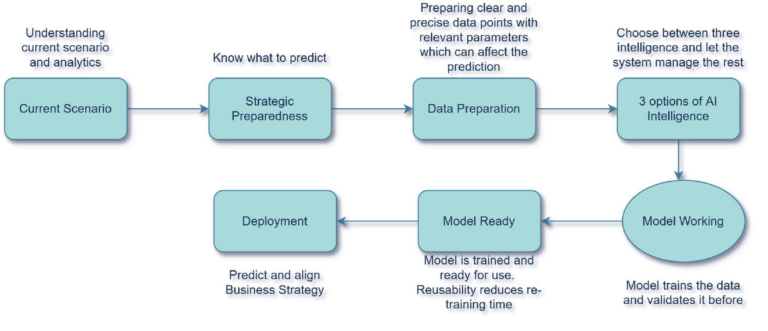
Every forecasting workflow starts with historical information. The data represents the behaviour of a system over time and becomes the foundation from which the model learns patterns. E.g. in the current usecase, the dataset may contain demographic information, operational measurements, environmental indicators, economic variables, infrastructure attributes, or business metrics. The quality of the forecast is heavily dependent on the quality and completeness of the historical data.
Each area is represented using regions where information was captured on a granular level. Repeating this process manually for every region would be a real challenge, but by drawing on key parameters from multiple data sources, the tool can offer a holistic solution instead. This choice makes the data intuitive for local projects and relatable for demonstrations. The datasets include realistic but synthetic values for population density, households, commercial area, weather indicators, and infrastructure age.
Because the data structure mirrors real GIS tables, the workflow feels natural to analysts. To consolidate and predict the capabilities of the future demand and needs, one needs to understand and identify key parameters which can provide a pseudo alternative prediction. The following parameters provide key insights and influence water demand in different ways:
- Population and households drive basic usage.
- Commercial areas increase demand in business zones.
- Temperature and rainfall affect seasonal consumption.
- Pipeline age reflects losses and inefficiency.
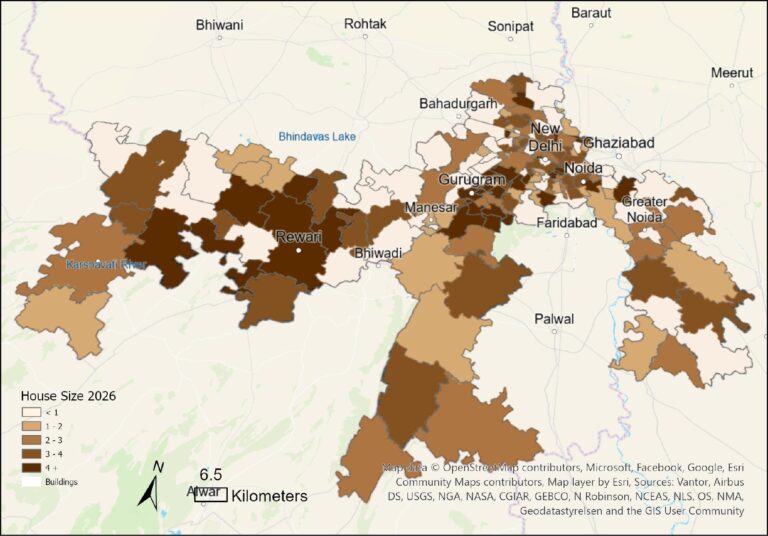
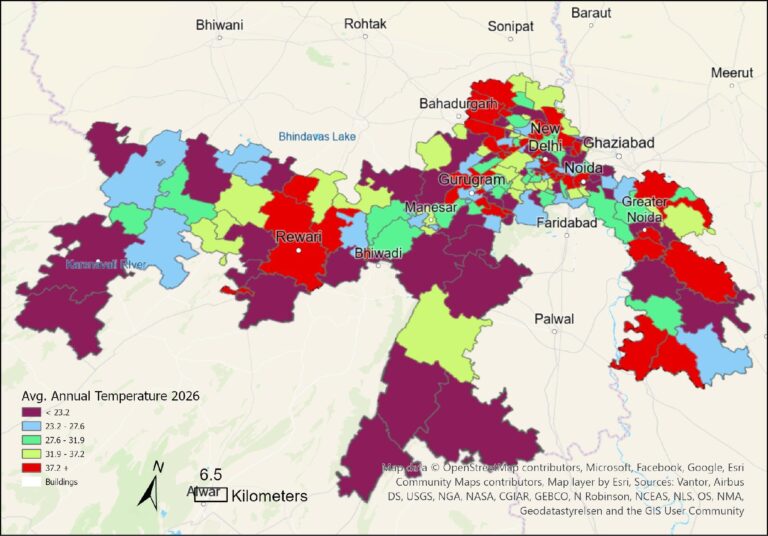
Before training begins, the data must be prepared. This stage typically includes:
- Selecting useful parameters
- Removing incomplete records
- Reviewing data quality
This ensures the model receives meaningful information from which it can learn.
Three Levels of Intelligence
The training phase is where historical patterns are transformed into predictive knowledge. The model examines historical examples and begins identifying relationships that may not be obvious through traditional analysis. This process creates a mathematical representation of the underlying behaviour within the data. Traditional regression models assume relationships are linear. But in real cities:
- Demand spikes are uneven
- Climate effects are nonlinear
- Infrastructure creates hidden inefficiencies
This is where Artificial Neural Networks help. They don’t require predefined relationships. Instead, they learn patterns from data automatically. While they help in identifying patterns, not every problem requires complex AI. To keep things simple, the tool offers three model choices:
- No AI uses a very simple neural network and acts as a baseline.
- Basic AI adds moderate depth and handles most real-world forecasting needs.
- Complex AI uses a deeper network for large and information-rich datasets.
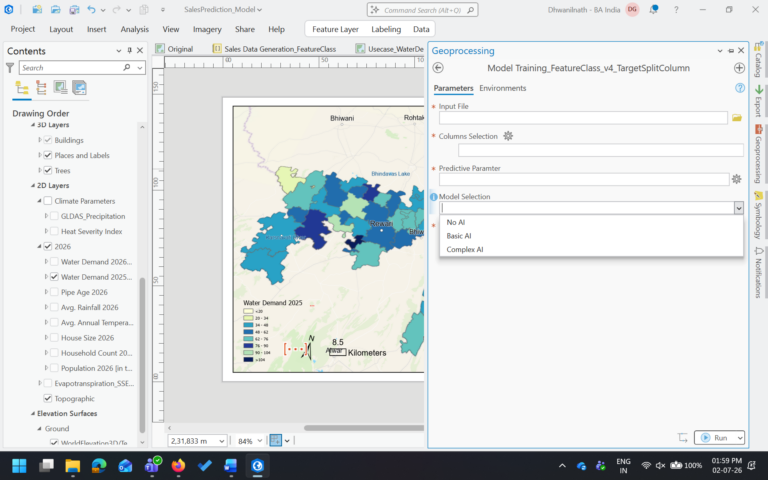
Users select the model from a dropdown without needing to understand neural network architecture. When the training tool runs, ArcGIS Pro automatically prepares and standardizes the data (ensuring all features are on the same scale and that no single variable dominates), trains a neural network, and evaluates its performance.
To measure performance objectively, historical data is divided into two groups:
- Training data
- Testing data
The model learns from the training portion and is evaluated using data it has never seen before. This helps determine whether the model is learning meaningful patterns rather than simply memorizing historical records. The process includes splitting data into training and testing sets (handled automatically by the workflow, removing this burden from the user), normalizing variables, and computing accuracy metrics.
After training, the model is assessed using performance metrics. Typical metrics evaluate:
- Prediction error
- Model accuracy
- Ability to explain observed variation
These metrics help determine whether the model is ready for operational use. Results such as RMSE and R-squared values are reported directly in the geoprocessing window, keeping the process transparent and understandable. Once validated, the model is saved for future reuse. The trained model can then be applied repeatedly without worrying about training time and computational strain.
Looking One Year Ahead
Once validated, the model is saved for future reuse. This step separates the computationally intensive training process from operational forecasting. A trained model can then be applied repeatedly across new datasets without requiring retraining. The model uses patterns learned from historical data to estimate future values. This transforms raw projections into actionable forecasts.
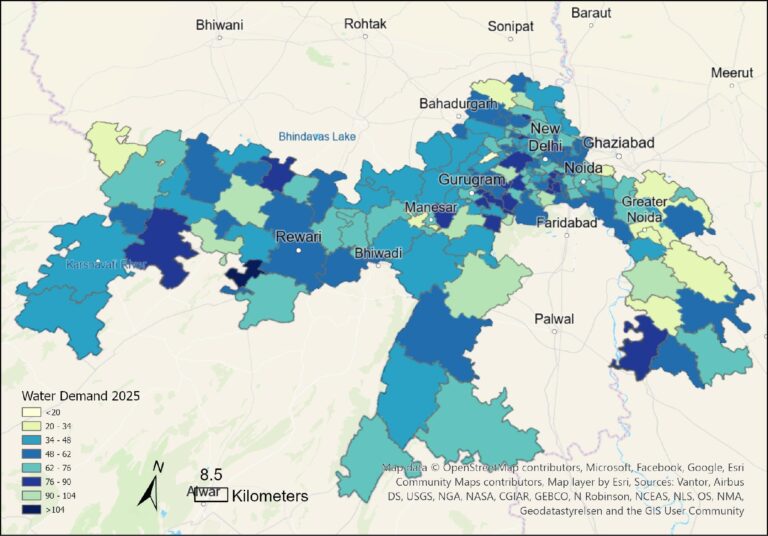
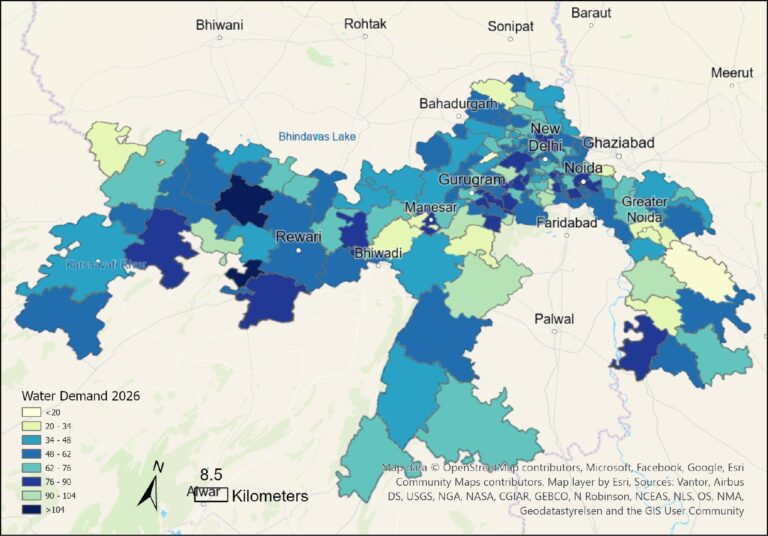
To demonstrate forecasting, a one-year-ahead dataset is created by applying realistic growth assumptions. Population and households increase slightly, infrastructure ages by one year, and climate variables shift modestly. The prediction tool applies the trained model to this future dataset, producing forecasted demand values for each PIN code. These results can be joined back to spatial layers and visualized as maps, showing growth hotspots and areas of potential stress.
This approach succeeds because it keeps forecasting where GIS professionals are most comfortable: inside ArcGIS Pro. Complexity is hidden, models are reusable, and results are easily mapped and communicated. Forecasting becomes most valuable when results are visualized and interpreted. By integrating forecasts with GIS, business intelligence, or reporting systems, organizations can identify:
- High-growth areas
- Emerging risks
- Resource requirements
- Infrastructure needs
- Investment priorities
More importantly, the workflow supports better conversations between analysts and planners by turning future scenarios into clear spatial insight. Maps have always helped us understand the present. By adding forecasting, GIS also helps us prepare for what comes next.

Dr. Dhwanil, Group Manager - Presales, offers expert presales and consulting services to Esri India customers in the enterprise sector.