In today’s data-driven enterprise GIS world, organizations demand high-fidelity editing, continuous availability, and governance at scale. ArcGIS Branch Versioning delivers exactly that—enabling multiple editors to work fast, safely and simultaneously through service-based workflows, while ensuring auditability, conflict detection, and controlled publishing.
Seven years since its introduction, Branch Versioning has matured into the backbone of ArcGIS Utility Network and mission-critical systems across utilities, telecom, and infrastructure. This article explores how Branch Versioning differs from traditional approaches, why it matters, and how organizations can leverage it for modernization.
What Is ArcGIS Branch Versioning?
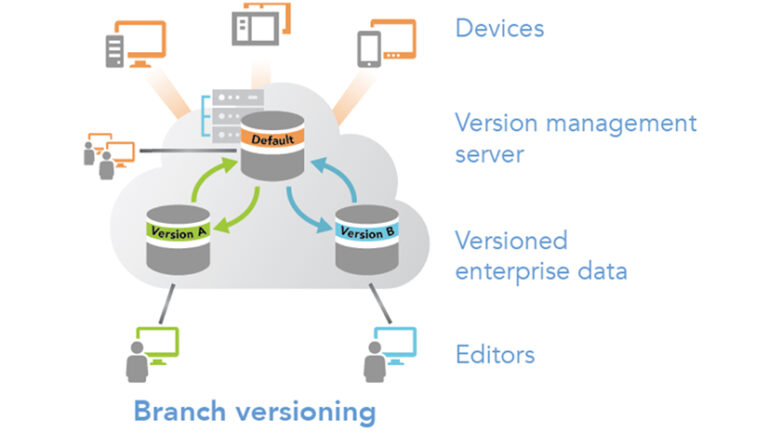
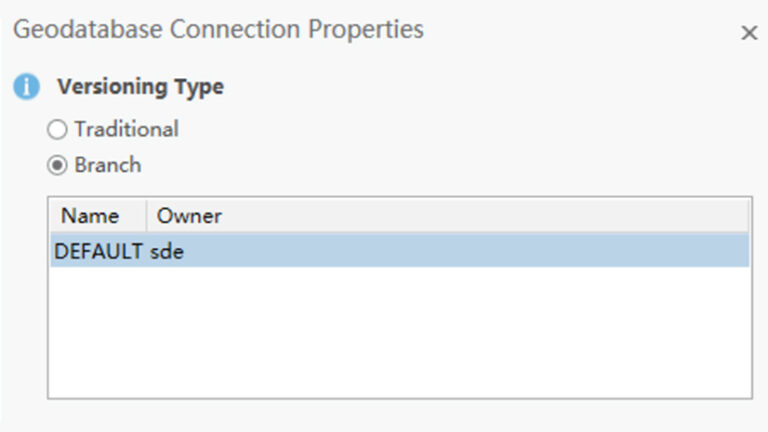
1. Branch Versioning is a service-oriented editing model in ArcGIS Enterprise where all edits are performed through feature services only (It is not possible to edit the branch versioned data directly through a database connection), and versions are maintained as logical branches of the default published dataset. It supports multi-user editing, reconciling & post workflows, conflict detection, and always-on data access.
2. Branch versioning operates on a temporal model. It uses editor tracking to record modifications in the base table. Unlike traditional versioning, there are no delta tables or state tables, and data that is branch versioned does not require compression.
3. All branch versions are created with the default version as the parent; only a single version level is permitted. In contrast to traditional versioning, where a version tree can extend several generations deep, branch versioning restricts versions to the “child” level and does not permit any versions beneath it.
4. With a reduced number of system tables and a more straightforward version tree, branch versioning has the potential to enhance performance and streamline administration.
Why Branch Versioning Matters for Organizations
India’s utilities, telecom, and infrastructure providers operate at national scale with complex assets, frequent updates, and regulatory reporting. Branch Versioning provides data integrity at scale, operational continuity, governance & audit, and integration readiness.
- Utilities & Telecoms: Manage complex, national-scale assets with continuous updates.
- Government & Infrastructure: Ensure compliance, auditability, and governance.
- Smart Cities & IoT: Enable integration with digital twins, predictive analytics, and sensor data
| S.No. | Aspect | Traditional Versioning | Branch Versioning |
| 1 | Editing and Security |
|
|
| 2 | Tables & Administration |
|
|
| 3 | Compression |
|
|
| 4 | Version Tree |
|
|
| 5 | Integration with Modern GIS Features |
|
|
| 6 | Conflict Management Overhead |
|
|
| 7 | Service Limitations/ Web & Cloud Readiness |
|
|
Frequently Asked Questions
Let us address several inquiries regarding branch versioning to ascertain whether it is suitable for your organization.
1. Do I need Branch Versioning for the ArcGIS Utility Network?
Yes. Utility Networks, parcel fabrics, trace networks, and linear referencing systems (LRS) require Branch Versioning. If your enterprise workflows involve these advanced datasets, Branch Versioning is mandatory.
2. Can I use both Branch and Traditional Versioning in the same geodatabase?
Yes. You can mix strategies within the same enterprise geodatabase, but not on the same dataset. For example, one dataset can be branch versioned while another uses traditional versioning.
3. Is Branch Versioning replacing Traditional Versioning?
No. Branch Versioning is an alternative, not a replacement. Traditional versioning remains relevant for workflows requiring direct database access or replication. Branch Versioning is designed for modern, service-based, and cloud-ready workflows.
4. What are the advantages of Branch Versioning?
- Multi-user collaboration without locks
- Simplified administration (no delta tables or compression)
- Enhanced security (no direct DB connections)
- Full audit trails with editor tracking
- Integration with IoT, AI, and digital twins
- Essential for Utility Network and smart city workflows
5. What are the limitations of Branch Versioning?
- Editing is only available via services (no direct DB connections).
- Version trees are limited to one child level.
- Some legacy datasets (e.g., network datasets, terrain datasets, replication) are only supported with traditional versioning.
6. How do editors manage versions in Branch Versioning?
Through the Version Management Service (VMS). Tools like the Branch Version Management widget in ArcGIS Experience Builder allow users to create, switch, assign, and delete versions directly in a web interface.
7. Is Branch Versioning suitable for my organization?
Branch Versioning is suitable if:
- You need Utility Network or advanced datasets.
- You want service-based editing for distributed teams.
- You require auditability and compliance-ready workflows.
- You are modernizing toward cloud, IoT, or smart city GIS.
If your workflows rely heavily on direct DB access or replication, traditional versioning may still be necessary.
8. What best practices should I follow with Branch Versioning?
- Use named versions per project.
- Reconcile often to minimize conflicts.
- Maintain QA staging environments.
- Automate validations and indexing.
- Document conflict resolution policies.
Conclusion
Branch Versioning is not a one-size-fits-all solution, but it is the future-ready model for collaborative, governed, and scalable GIS editing. Organizations should evaluate their workflows, datasets, and modernization goals to decide if Branch Versioning is the right fit.

M Raja Goud is a Technical Consulting Manager with expertise in utility & telecom GIS, and holds a certification in Esri ArcGIS Utility Network.